Affiliate marketing agencies
Monitor selected affiliate and publisher links for redirect-chain changes, unexpected destinations, and destination drift.
Learn more
GhostLink monitors redirect integrity for trusted business links, helping teams see where affiliate, creator, campaign, QR-code, shortlink, vendor, and partner URLs actually land after redirects.
GhostLink follows redirect chains, records the observed final destination, compares it to the expected destination domain, and alerts teams when qualifying destination changes are detected.
New to the category? Learn what redirect integrity monitoring means and why uptime alone does not prove a trusted link still lands where expected.
GhostLink is especially useful for affiliate marketing agencies, ecommerce brands, creator partnership teams, marketing operations teams, and agencies managing high-trust links across campaigns, creators, QR codes, shortlinks, and partner destinations.
Monitor selected affiliate and publisher links for redirect-chain changes, unexpected destinations, and destination drift.
Learn moreCheck creator, ambassador, sponsor, and product links that continue driving traffic after campaigns go live.
Learn moreVerify where printed QR codes, campaign URLs, branded shortlinks, and landing-page redirects actually send visitors.
Learn moreKeep evidence of redirect paths, observed final destinations, and expected-domain comparisons for investigation.
View sample reportSee how affiliate redirect chains work and why the final destination matters.
Read the guideLearn how to audit where affiliate links redirect, what final destination is observed, and whether the expected domain still matches.
Read the guideA ghost redirect happens when the visible or expected link still looks legitimate, but the redirect path behind it changes. Customers may click a branded shortlink, affiliate URL, QR code, or campaign link and land on a destination your team did not intend.
That change can be harmless, like a normal www redirect, or it can signal destination drift, attribution loss, merchant destination changes, or another redirect-chain change that needs investigation.
GhostLink is designed to monitor selected URLs you own, manage, or are authorized to check. It provides destination visibility and redirect-chain evidence for investigation, but it does not guarantee that a link is safe.
Most tools answer only part of the trusted-link problem. GhostLink focuses on what happens after the click.
Traditional uptime tools can confirm whether a URL returns a successful response, but a green check does not always mean the visitor landed where the team expected.
Shortlink and QR tools help teams manage links and track clicks. GhostLink works alongside those tools by monitoring the redirect path and observed final destination over time.
GhostLink checks selected trusted links after redirects, records redirect-chain evidence, compares the observed final destination to the expected domain, and alerts teams when qualifying destination drift is detected.
Monitor selected affiliate links, creator links, ambassador links, QR-code destinations, campaign URLs, and branded shortlinks for unexpected destination changes, broken redirect chains, and expected-domain mismatches.
Request a Free Affiliate & Creator Link AuditMonitor selected shortlinks, partner URLs, vendor links, QR destinations, and customer-facing campaign links for destination drift and redirect-chain evidence that may need investigation.
View Sample Redirect ReportGhostLink does not replace shortlink platforms, QR-code systems, affiliate platforms, campaign tools, analytics tools, or uptime monitors. It adds a redirect integrity layer by checking where selected trusted links actually land after redirects.
Create and route links in your existing tools. Use GhostLink to monitor destination integrity after the click.
A link can load successfully and still send visitors somewhere unexpected. Learn why campaign links, QR codes, affiliate links, and branded redirects need destination-aware monitoring.
Check one authorized affiliate, creator, ambassador, campaign, QR-code, branded shortlink, vendor, or partner URL. GhostLink follows the redirect path, compares the observed final destination to the expected domain, and returns a plain-English result.
Not sure if GhostLink is useful for you? Start with one important URL and see where it actually lands after redirects.
We use your business email to send the diagnostic result and prevent abuse.
GhostLink is designed to monitor selected trusted links your teams already rely on and identify when a benign-looking path starts landing somewhere unexpected.
Track branded shortlinks, affiliate links, campaign redirects, QR destinations, and other URLs where trust and destination integrity matter.
GhostLink checks redirect paths and compares observed final destinations against expected domains so suspicious changes are easier to spot.
Teams get readable incident detail that helps them understand what changed instead of just being told a link is down.
When GhostLink detects suspicious redirect behavior, the alert gives responders the context they need quickly: what was checked, where it landed, how it got there, and what to do next.
The goal is simple: help a security, marketing, or ecommerce owner understand the issue in seconds.
A trusted campaign link now resolves to an unexpected login-style destination after multiple redirects. Review the campaign destination, disable the public link if needed, and confirm partner tracking has not been modified.
GhostLink monitors selected trusted links used across campaigns, creator programs, affiliate programs, QR codes, partner URLs, and customer-facing pages.
Monitor where creator, sponsor, YouTube description, and link-in-bio URLs actually land after redirects.
Learn moreCheck selected affiliate links for unexpected destination changes that affect trust, revenue, or review.
Learn moreKeep visibility into ambassador links that live in bios, posts, reviews, and older campaign content.
Learn moreVerify campaign URLs, email links, branded shortlinks, landing-page links, and partner campaign URLs.
Learn moreReview where long-lived QR-code destinations land after redirects on packaging, events, and print.
Learn moreSee demo redirect-chain evidence, observed final destination, expected domain comparison, and summary.
Learn moreGhostLink focuses on a monitoring gap many teams do not cover well: links that still appear to work, but now resolve in ways that create hidden security, trust, or revenue issues.
It is built to help teams recognize redirect problems faster and understand what changed without digging through noisy tooling first.
Clear original, expected, and observed destination detail for faster triage.
Reduce the chance that silent redirect abuse goes unnoticed.
Begin with the links that matter most and expand over time.
Customers manage monitored links, alert recipients, team access, and billing from a self-service portal. When a trusted URL reaches an unexpected destination, GhostLink records the evidence and presents the change in plain language.
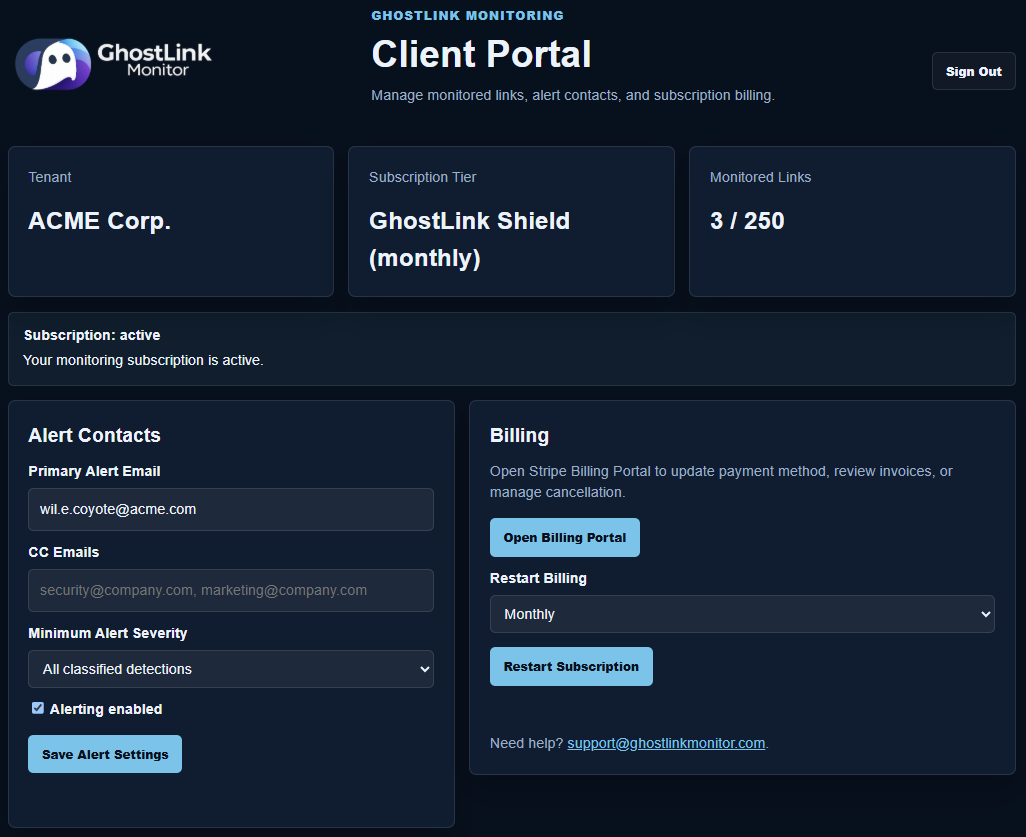
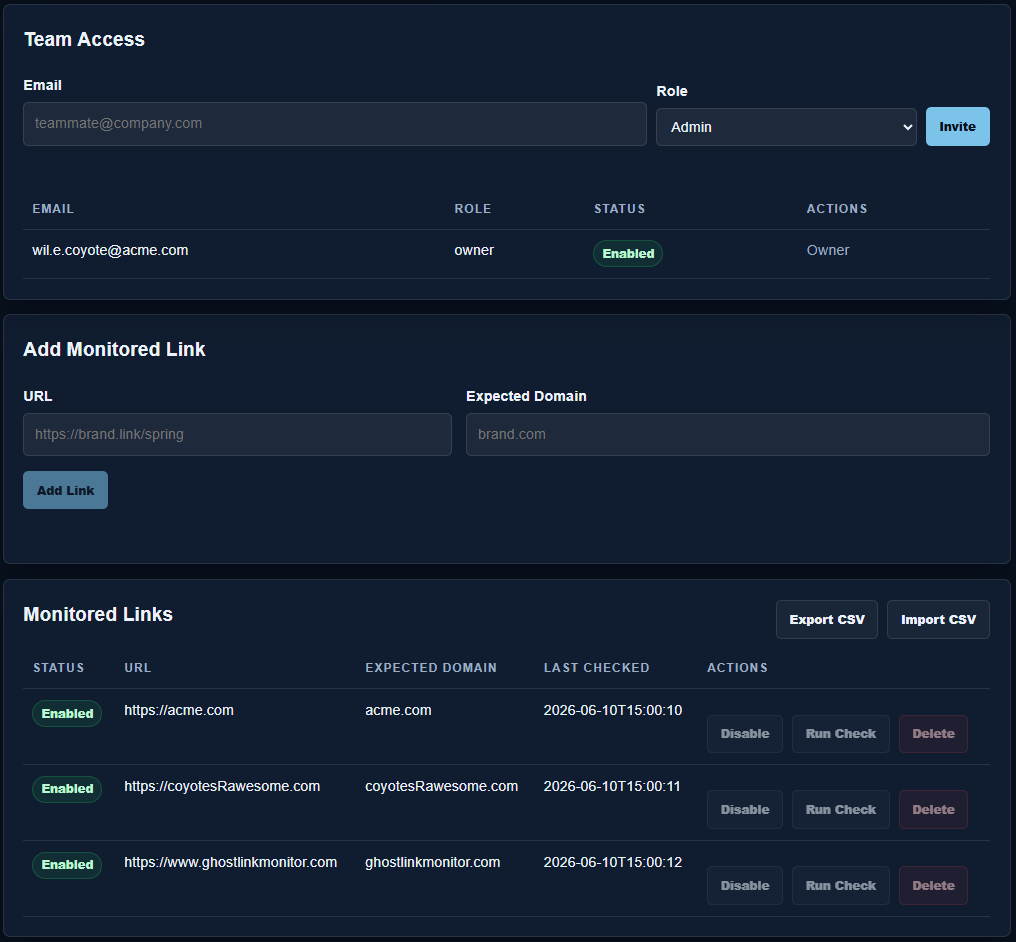
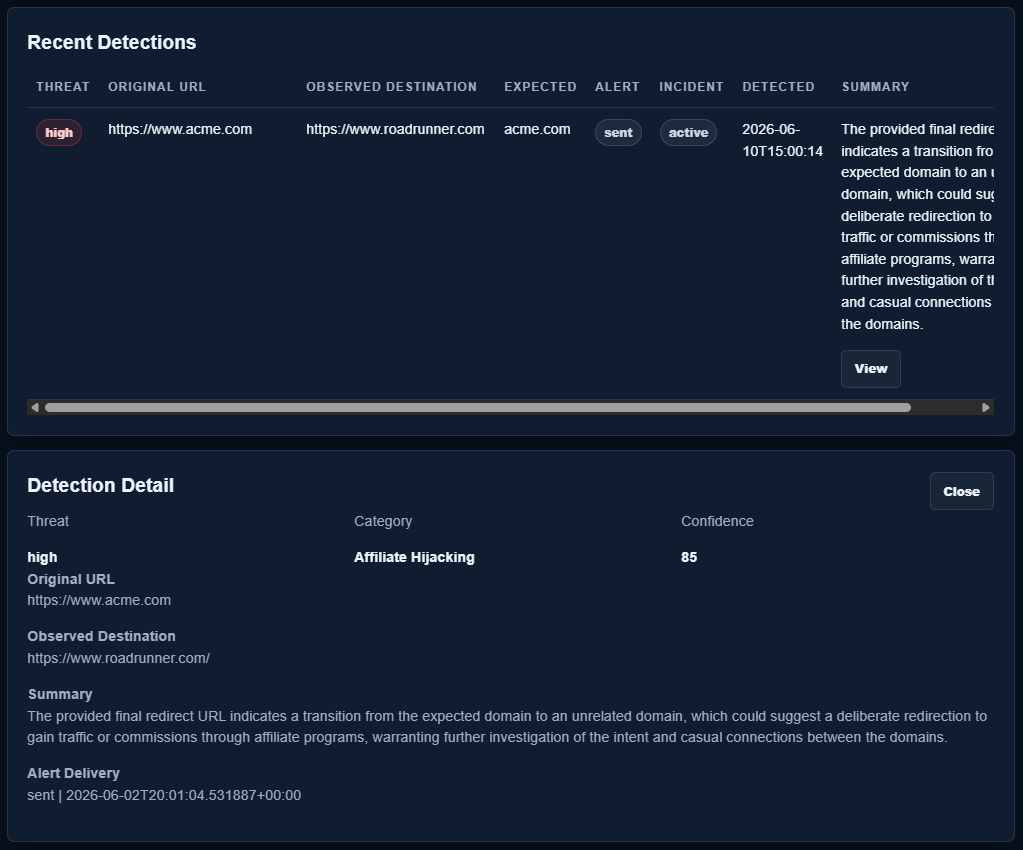
Screens show fictional demonstration data. No customer information is displayed.
GhostLink Shield is the initial monitoring plan for teams that want practical redirect protection without a long security procurement cycle. We help you onboard the first link set, tune alert recipients, and expand once the high-trust URLs are covered.
Continuous redirect monitoring for the links customers, partners, and campaign audiences already trust.
Very large portfolios and agency multi-client monitoring needs can be scoped after the initial plan is live. See the subscription and refund policy for cancellation, billing, and support details.
GhostLink Shield covers up to 250 monitored links with hourly redirect checks. For agencies, multi-brand teams, or higher-volume monitoring needs, contact us about custom monitoring options.
After Checkout, submit your alert recipient and first high-trust URLs. GhostLink will create your tenant configuration and begin monitoring the submitted links. You can then manage links, alert contacts, team access, recent detections, and subscription billing through the Client Portal.
GhostLink is focused on redirect integrity: where trusted links actually send people, and whether that behavior still matches what your team expects.
GhostLink checks the submitted URL, follows redirects, records the observed final destination, and summarizes the redirect behavior and risk signals.
No. GhostLink is designed around redirect monitoring and link integrity, especially for trusted links that customers, partners, or campaign audiences already click.
Branded shortlinks, affiliate links, QR code destinations, campaign links, vendor links, partner URLs, and high-trust links in emails or landing pages are strong candidates.
Yes. The Free Link Check is a sample analysis. The monitoring product is built to check selected links repeatedly and alert when suspicious or unexpected redirect behavior appears.
GhostLink stores the redirect evidence, classifies the issue, deduplicates repeated detections, and can send a readable alert with the context a responder needs for quick triage.
GhostLink Shield includes up to 250 monitored links, hourly checks, email alerts for high-risk detections, redirect-chain evidence, AI summary, incident deduplication, and a self-service Client Portal.
Yes. After the initial Checkout and onboarding form, the Client Portal lets account owners manage monitored links, alert contacts, team access, recent detections, and Stripe subscription billing.
GhostLink Shield is billed as a recurring software subscription through Stripe. Account owners can cancel through the Stripe Billing Portal. Access continues through any remaining paid service period, then link management and monitoring pause when the subscription becomes inactive.
Only submit URLs you are authorized to check. GhostLink blocks common private/internal targets and uses anti-abuse controls, but the tool should not be used for confidential links or unauthorized testing.
Begin with GhostLink Shield, cover the links that matter most, and expand once the first monitoring workflow is proven.